
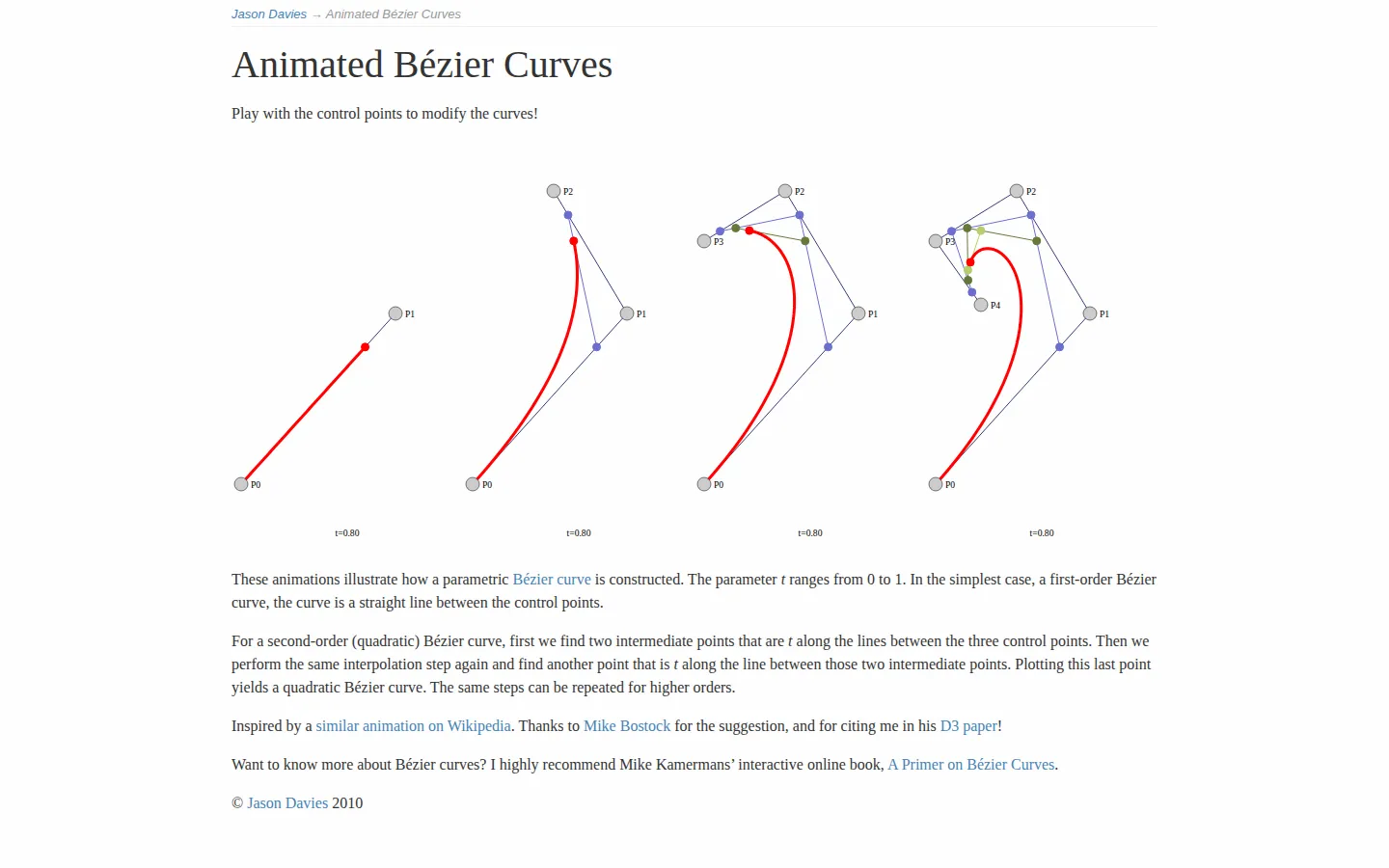
Animated Bézier Curves turns a bit of recursive geometry into a moving diagram you can reshape. Colored guide segments interpolate between control points while a parameter travels from zero to one, tracing quadratic, cubic, and quartic curves without burying the idea under a wall of notation.
What is Animated Bézier Curves?
A finished Bézier curve looks effortless, which neatly hides all the straight-line work underneath. Jason Davies's visualization puts that labor back onstage. Control points anchor a small family of examples, intermediate points slide along the segments between them, and another layer of interpolation repeats until the final point traces the curve. Quadratic, cubic, and quartic constructions sit together so the recursion is visible rather than merely stated. Move a control point and its corresponding position changes across the examples, making the relationship between shape and scaffolding immediate. A short explanation below starts with the linear case, walks through the two interpolation passes needed for a quadratic curve, and points toward the same method at higher orders. It is compact enough for a quick intuition check and precise enough to reward a slower pass.
What you can do there
- Watch recursive interpolation draw Bézier curves
- Move control points to reshape several curve orders
Why we picked it
The page solves the hardest part of this topic: seeing the process instead of only the polished result. Its moving spans make the recursive rule legible at a glance, while draggable points invite the useful kind of meddling. It is an elegant little proof that a diagram can do more teaching than another paragraph of symbols.
How to get the most from it
First watch one full cycle without touching anything and follow the outer guide points inward toward the point drawing the curve. Then move a single control point and compare how the quadratic, cubic, and quartic examples respond. Return to the written quadratic explanation afterward; the two-stage interpolation should read much more plainly once you have watched it happen.
Good to know
This is a focused construction demo, not a general curve editor, and it assumes some comfort with points, line segments, and a parameter running from zero to one. Continuous motion is central to the explanation. Current drag behavior, touch support, keyboard access, screen-reader labeling, reduced-motion handling, audio, and performance were not tested, and no screenshot was captured.
Who made it, and when?
Jason Davies is the credited creator or organization.
Creator’s official page Open Animated Bézier CurvesMore like this
AutoDraw

Sketch badly on purpose and let machine-assisted suggestions turn it into a crisp icon.
Calligrapher.ai
A browser scribble machine that gives typed words a wobblier set of shoes.
Sketch Toy: Draw sketches and share replays with friends!

A doodle pad that remembers every stroke and turns the making into the show.
Wombo Dream AI

A prompt-powered sketchbook for images and video.